S - CIELAB:
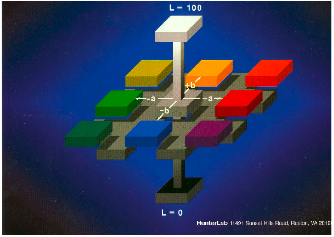
To measure our results we used the S-CIELAB. As learned in class the CIELAB metric allows us to measure the color difference between color targets that are large (2D), uniform, and static. There are three components to the LAB values but for a gray scale image the a* and b* values should be constant/zero across all the images.
| |
|
|
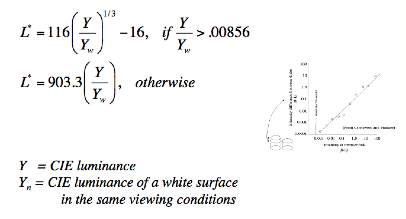
Therefore, we the difference between our images should only correspond to differences in the CIELAB ‘Luminance’ values.
Since CIELAB was designed for large uniform targets there has been extension called S-CIELAB that allows us to measure the perceptual color difference in delta E for spatial images that have texture and patterns (not uniform). |
|
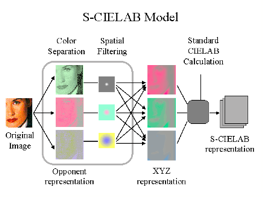
S-CIELAB works by performing a color transformation and spatial filtering step before performing the CIELAB calculation. Now we can use S-CIELAB to measure the perceptual difference between our temporary solution, copying adjacent rows, to the methods outlined in the algorithms section.
CIELAB calculations take into account "a lot of factors, such as the cone sensitivity of the eye, the ambient illumination, the spatial pattern of the targets, etc."[5] These factors need to be setup before running the S-CIELAB code. The important factors that were altered from the code provided by Professor Wandell were the viewing distance and the dots per inch. After talking to Fairchild we were informed that dentist typically view these images from two feet or 24 inches away. Also, the dentist blow up these images heavily to look at the details of the images very closely. Therefore, even though a typical display has 72 dots per inch, we estimated that the dentist will be viewing images with 12 dots per inch. |
|