The above 'S' is from Arial font family, size 12.
On a LCD that has 200 DPI, each pixel is approximately 400um by 400um.
EE 362, Winter 2006-2007
Colorfulness Analysis of ClearType Fonts
Jiajing Xu
| Introduction | Methods | Results | Conclusions | References | Appendix |
Methods
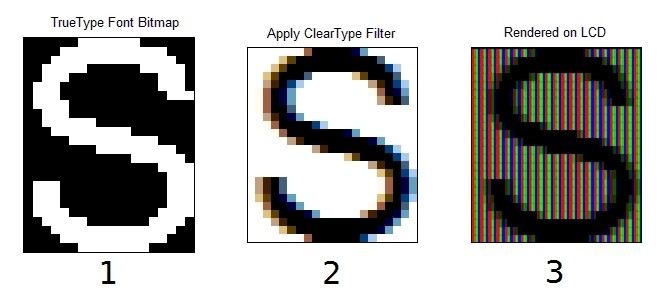
With the help of the ClearType Toolbox developed by Prof. Brian Wandell and X.M. Zhang, I am able to do the whole ClearType simulation in Matlab, starting form rasterizing to display rendering. The work flow is shown in the diagram below: Given the choice of the letter, its size, and font family, the Microsoft Font Rasterizer will return a TrueType font glyph in bitmap format that specifies individual pixel locations for this particular font. (figure 1) Then we'll run this image through the ClearType filter that fine-tunes the individual sub-pixel (figure 2) This will be the exact image you would see on your screen if you use some type of screen-zoom software (i.e. Intel's IgfxZoom tool). The last step, with the help of ctToolbox and ISET toolbox, is to render this image on a LCD model. (figure 3) At this stage, the white pixels have all been transcribed into red-green-blue sub-pixels.
the first step is to retrieve the (composed of 0 and 1). Then we run it through the obtaining this edge blurred letter or the intensities of each sub-pixels. The last step is to render the filtered letter on modeled LCD.
|
The above 'S' is from Arial font family, size 12. |
I have the tools now, so what's next? In order to investigate the colorfulness of ClearType fonts, I need to have an ideal font image to judge the colorfulness of the others. The easiest and most intuitive reference would be the font rendered on a high resolution display (i.e. DPI = 200). In such a high resolution, the color artifacts is barely noticeable. Hence, comparing the font images rendered on lower resolution to the reference gives me a measurement of the colorfulness being introduced. The best computational experiments to predict the perceived quality of images is the spatial extension of CIELAB, a.k.a. S-CIELAB. A detailed description and papers about S-CIELAB could be found at Prof. Brian Wandell's dedicated S-CIELAB website, or here. The main idea of S-CIELAB is to use a spatial filter selecting color component according to the spatial sensitivity of the human eye to account for how spatial pattern influences color appearance and color discrimination, which greatly improves the accuracy of the predicted quality produced by CIELAB. Before using S-CIELAB, I need to provide the viewing distance and LCD DPI to determine the sample per degree parameter in S-CIELAB.
Metrics (S-CIELAB)
The CIELAB system predicts how well colors match each other perceptually. S-CIELAB is an extension to the system by Wandell and Zhang which takes into account the spatial sensitivity of the eye. By specifying the number of pixels per degree of arc, the system takes into account blurring in the eye to determine what colors are perceived over regions of the image. This is then compared to the original image to determine the amount of CIELAB perceptual error between the color in the original and compressed image. In this project the average error across the whole image is used.
| Introduction | Methods | Results | Conclusions | References | Appendix |
© 2007 jiajing