To
make the stereogram much more appealing and easier to view, we can slightly
modify our algorithm for random dot stereogram to replace the random dots by
bitmap patterns. The basic idea is
rather simple. Our goal is to
replace the random dots we inserted in each line with pixels from the pattern of
choice. How do we do this?
Before any constraints are added, for each line we overlay repeating
blocks of the pattern we wish to insert: repeating
because we assume the width (the length of the “x-coordinate”) be smaller
than the width of Z (the depth map of the object).
Then, as in the case of random dot stereograms, we scan each line and
impose the necessary constraints and have the constraints override the existing
pixel of pattern at that point. For
points that are unconstrained, we leave that point (which already has the pixel
of the pattern in place) untouched. The
following technicalities will further clear up this idea.
pix =
zeros(1,MaxX,dep);
% copy pattern into
right most portion of pix array
rightX = MaxX;
leftX = MaxX-patX+1;
pat_line = mod((y-1),patY)+1; %
the vertical line of pattern to use.
%
copy pattern into right side of pix array
pix(1,leftX:rightX,:) = pattern(pat_line,:,:);
We
then shift the pointers, but assigning the right pointer to the pointer that was
initially assigned left, and we assign the left pointer at a distance patX from
the right pointer. We again fill
the space between the left pointer and right pointer with the pattern.
We repeat this process until we filled the whole pix
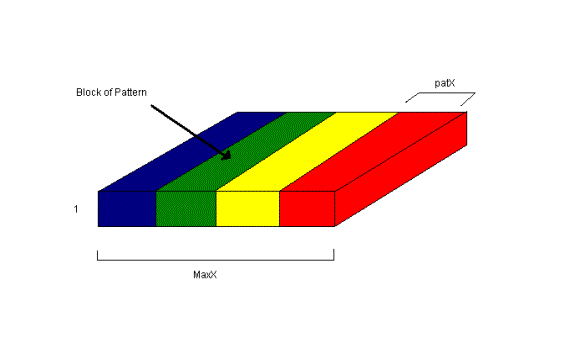
array with repeating blocks of pattern. Note
that we have to have a condition that checks when we have filled up the whole
array. The end result of the pix
array will look something like this:
There
is still one minor detail that has to be discussed when placing the blocks of
pattern together. When we place the
blocks together, it is not desirable to have rapid changes at the boundary,
since this will cause small but noticeable patches in our resulting image.
To make a smoother transition at the boundary, instead of stacking
together the same block of pattern, we stack together a block and its reversed
or flipped block. Thus, this ensures the pixel at the boundary would have the
same color. The following code performs the pattern placing as mentioned:
% copy a reversed
line of the pattern into rest of image, reverse to avoid accidental alignment
% do this to avoid
black patches
rev_pat =
pattern(pat_line,linspace(patX,1,patX),:);
done = 0;
rightX = leftX-1;
leftX = rightX-patX+1;
while
~done
pix(1,leftX:rightX,:)
= rev_pat(1,patX-(rightX-leftX):patX,:);
rightX
= leftX-1;
leftX
= rightX-patX+1;
if
rightX<1
done
= 1;
else
if
leftX<1
leftX
= 1;
end;
end;
end;
All
we are left with then is to identify the constraints, then override the existing
pixel with that constraint. If the
points are not constrained, leave them alone with the pattern pixel already in
place. This section of the code is
almost the same as in the random dot case, with minor modifications in assigning
the pixels (note in the below code the line % pix(1,x,: ) = (rand(1)>0.5) has
been commented out to show that this line would of existed if we were filling up
the space with random dots – we leave this line out because we already filled
the unconstrained points with pixels form the pattern):
for
x = fliplr(1:MaxX)
if
(Same(x) == x)
% pix(1,x,:) = (rand(1)>0.5);
else
pix(1,x,:)
= pix(1,Same(x),:);
end;
im(y,x,:)
= pix(1,x,:);
end;

