Color Correction of a Photobit PB159DX Based Camera
Psych221 Final Project
March 16, 2000
Bennett Wilburn
I. Introduction.
Last spring I built a prototype camera tile for the Light Field Camera image based rendering research project. Image based rendering (IBR), in a nutshell, deals with rendering scenes using previously acquired images of the scene instead of the traditional graphics rendering combination of a geometric model and texture maps. Because it uses actual images, this method has the potential of creating photorealistic pictures of scenes that are too complex for a model based renderer. For more information on an IBR approach developed here at Stanford, check out the Light Field Rendering link. The goal of the Light Field Camera project is to make a large array of cameras to enable image based rendering using video data.
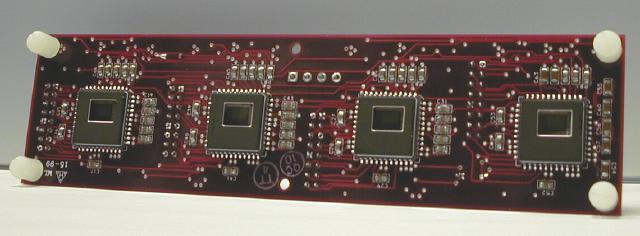
Shown below is the prototype camera tile with the lenses and lens mounts removed to show four Photobit image sensors. They are CMOS image sensors with a Bayer Mosaic color filter array and a resolution of 512x384. They have a basic auto-exposure algorithm that can be turned off (mostly), control over the gain of the red, green, and blue channels, and a few other goodies, but they have no color balancing or color correction logic. In order to generate realistic video from these cameras, I need to implement some sort of color correction algorithm.
For this project, I investigated using polynomial models to transform
from the image sensor RGB output values to device independent XYZ values.
I've seen several image sensors and color processing chips that try to
do this using either a direct 3x3 linear transformation or higher order
polynomial models ( see [4] and [5], for example--the color correction
for [5] was described at the conference but not in the paper), but I could
not find a comparison of these methods, so I decided to check it out myself.
It turns out that getting the experimental setup correct was tougher than
checking out the different models, and I learned some useful lessons about
my image sensors in specific and the color correction task in general.
Finally, becuase I'm ultimately interested in making pretty pictures, I
assumed some standard monitor specifications to complete the path from
camera data to images ready for display on a monitor.
II. Methods.
Because of the number of image sensors in the planned array (possibly 100 or more), I need a relatively simple calibration method, so I decided to base my approach on the MacBeth color checker chart. Here are the steps I used:
1) Establish ground truth XYZ values for the MacBeth color checkers. Under controlled lighting, I used a spectroradiometer to measure the light reflected off the checkers on the MacBeth chart. The spectroradiometer was rigidly mounted with respect to the lights, and the color checker chart was moved to position each patch directly under the device. I multiplied the spectra by the xyz tristimulus functions to XYZ values for each checker. This was the easy part.
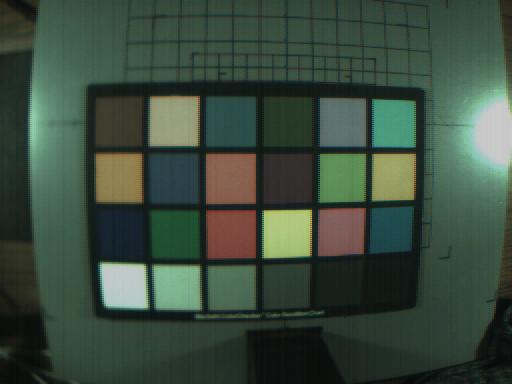
2) Measure RGB values for the color checkers. Under the same lighting, I replaced the photospectrometer with my camera array and repeated the measurements of the patches. In order to get accurate data, I had to account for several non-idealities of the image sensor, including the dark noise, controlling the exposure so the pixels values would not saturate, and the varying responsivities of the different colored pixels. After some trial and error, I settled on the following sequence of steps:
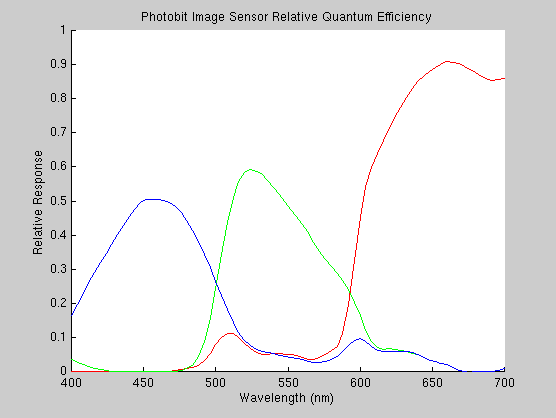
Shown below is the relative quantum efficiencies of the red, green and blue pixels on the Photobit PB159DX. This accounts for the transmission of the color filters as well as the quantum efficiency of the photodetectors. Notice that the imager is much more sensitive to longer wavelength light.
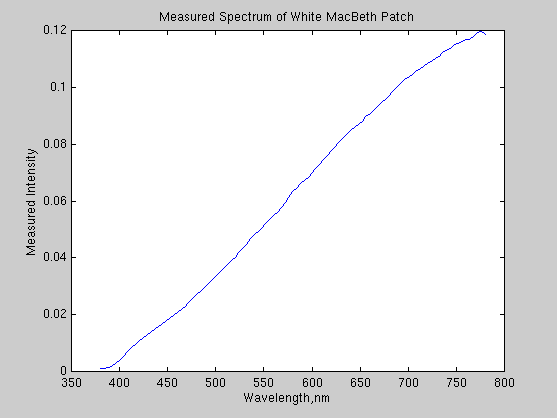
This next plot shows the measured spectrum of the white MacBeth patch,
which should be approximate the spectrum of our lighting. Notice that the
light has more energy in the longer wavelengths, further compounding the
problem of the red channel in the imager saturating.
This final plot shows the response of the red, green and blue channels to the grayscale MacBeth color checkers, after I attempted to set the exposure and color gain settings on the image sensor. The plot shows the the imager response is indeed linear until the pixels saturate. The saturation value, curiously, is not 256, but something less. From the plots, it is clear that the responses are extremely linear until the green and then blue and red channels saturate. The autoexposure had been fixed and the gain for the different color channels adjusted to give what looked like a pretty good distribution (from histogram data). Even so, I didn't get it exactly right. The good news is that only two of the grayscale values and one of the other color checkers had any saturated RGB values.
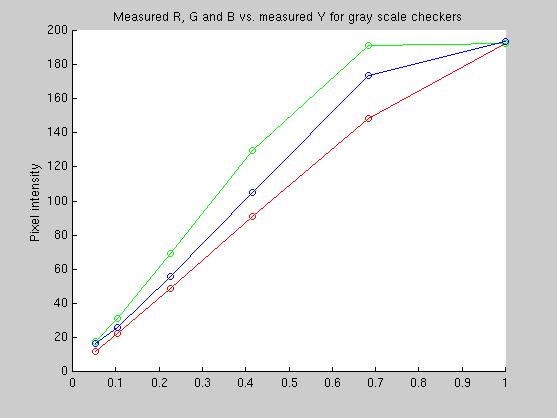
This plot
3) Calculate RGB to XYZ transformations using the different models.
| Model Number | Equation | Transformatin |
| 1 | C1*[R G B]' = [X Y Z]' | C1=3x3 matrix |
| 2 | C2*[R G B RG GB BR]' = [X Y Z]' | C2=6x3 matrix |
| 3 | C2*[R G B RG GB BR RR GG BB]' = [X Y Z]' | C3=9x3 matrix |
The color matches for all three transformations matched pretty well.
The table below lists the error to the data in the fit as well as the error
to data not included in the fitting data.
| Colors used in fit | Colors not used in fit | |||
| Model | MSE, CIE-XYZ | MSE, CIE-Lab | MSE, CIE-XYZ | MSE, CIE-XYZ |
| Model 1 (RGB) | 9.08e-4 | 52.7 | 1.44e-3 | 75.5 |
| Model 2 (R G B RG GB BR) | 4.88e-4 | 26.9 | 1.07e-3 | 50.8 |
| Model 3 (nine terms...) | 3.49e-4 | 23.7 | 1.55e-3 | 89.7 |
I see two lessons to be learned here. First, although the six term model is significantly better than the three term one for both colors in and out of the set used to make the fit, the improvement of Model 3 (second order, nine terms) over Model 2 (second order, six terms) is marginal for the data in the training set. More importantly, for data not used in the training set, the performance of the third model is actually worse than either of the other two models. This shows the danger of fitting with high order (even two...) polynomial models--they can be made to approximate the data used to generate them well, but for values outside that set, they can produce dramatically bad results. Thus, although Model 3 fits the colors used to create it well, it does that at the expense of the colors outside that set. Model 2 (R G B RG GB BR) is to be the best overall of the three that I tried.
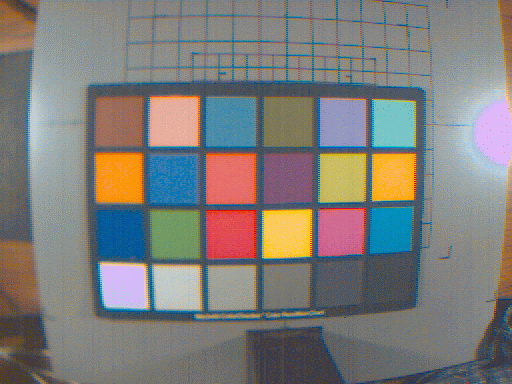
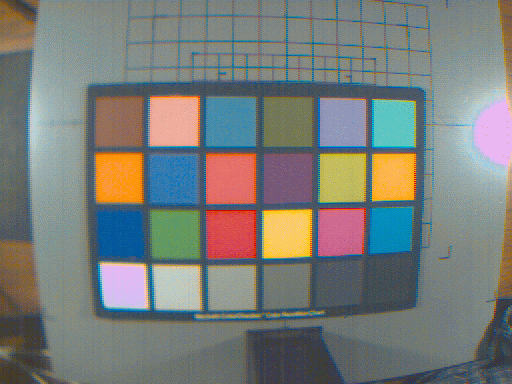
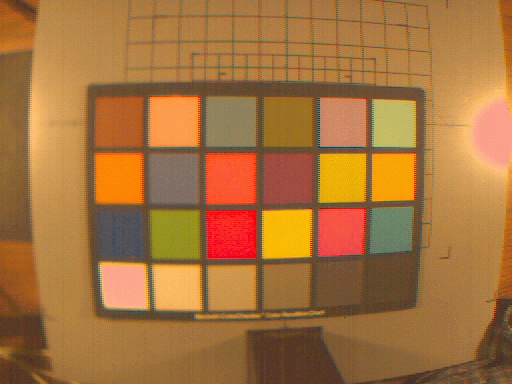
Ok, time for some pictures! First, here's one of the MacBeth color checker images, color corrected and processed for display on a generic monitor. The colors in these pictures look pretty good to me, but there are artifacts due to the simple Bayer interpolation (the wierd fringes on the checkers, for example), and incorrect gain and exposure settings (areas that saturated, like the reflection of the light and the white MacBeth checker, transform to wierd colors).
Model 1, 3x3 matrix multiply, [R G B]
Model 2, 6x3 matrix multiply, [R G B RG GB BR]
Model 3, 9x3 matrix multiply, [R G B RG GB BR RR GG BB]
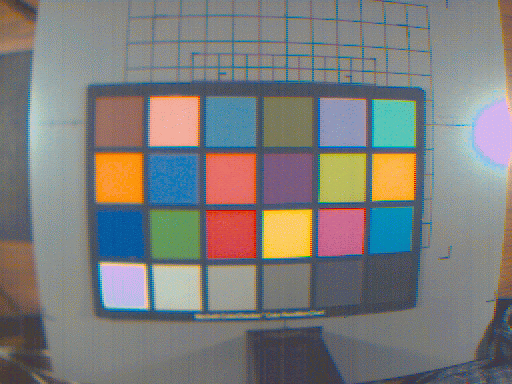
To my eyes, these three images are virtually identical, so I'll probably
stick with the 3x3 first order transformation because it is the fastest
and gives pretty good results. One very important caveat, though, is that
the picture, which is mostly of a MacBeth color checker chart, is being
transformed with matrices generated using all the colors in the chart.
Model 3 is probably doing better than it deserves because as I've shown,
it's less accurate when reproducing colors that were not in the model fitting
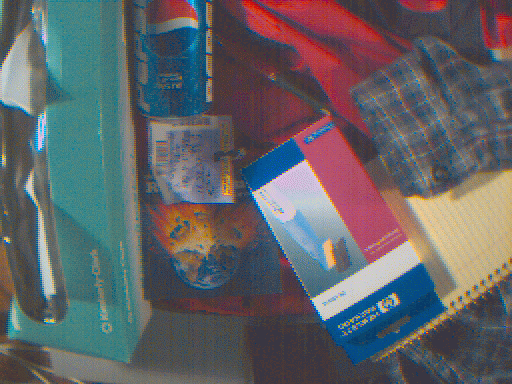
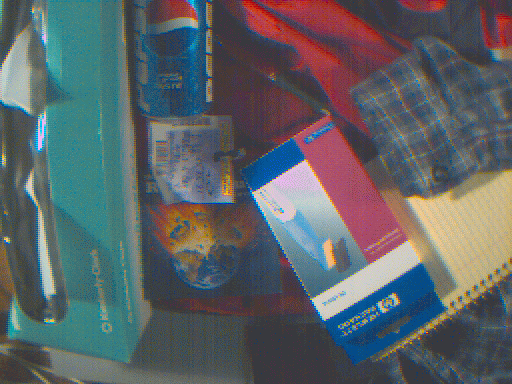
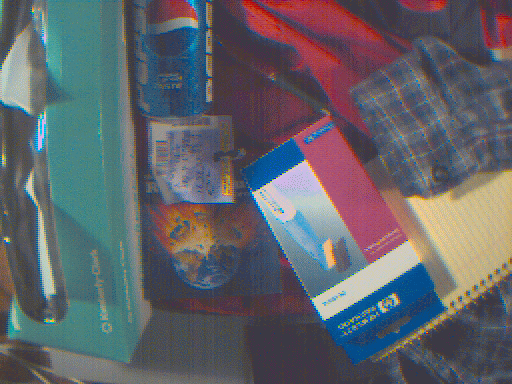
dataset. Just for kicks, I took a picture of a set of random objects. Here
are the color corrected results. But first, here's a telling picture to
show the power of human color constancy. Here's the image above (Model
1, if you're interested), without the whitePoint adjustment in CIE-Lab
space. I was looking at something very like this when I made these images,
and the white and gray patches looked white and gray to me, not brown.
Here is the image of some random lab items.
Model 1
Model 2
Model 3
IV. Conclusions. I drew the following conclusions from this effort:
I think a good area for work next year would be to compare these
models to a tetrahedral interpolation scheme like the one used by FengXiao
in his 1999 project [6]. Something interesting for me to pursue would be
using the data for the relative quantum efficiencies of the different colored
pixels for the image sensor to generate synthetic RGB values from different
spectra. This could be used to compare the calculated RGB response with
the actual imager response as well as to generate data for schemes that
require a lot of samples, like the tetrahedral interpolation sheme. Unfortunately,
I forgot to record the gain settings for my data, so doing this experiment
will require deducing the gains or acquiring another set of images.
V. References.
[1] Adams, J. et al. "Color Processing in Digital Cameras" IEEE Micro IEEE, Nov.-Dec. 1998. vol. 18, no. 6, p.20-30.
[2] Sharma, Gaurav, and Trussell, H. Joel. "Digital Color Imaging" IEEE Transactions on Image Processing, July 1997, vol. 6, no. 7, p.901-932.
[3] Poynton, Charles. "Colour FAQ" http://vera.inforamp.net/~poynton/ColorFAQ.html
[4] Loinaz, M. et al. "A 200 mW 3.3 V CMOS color camera IC producing 352*288 24b video at 30 frames/s" 1998 IEEE International Solid-State Circuits Conference. Digest of Technical Papers. ISSCC. Held: San Francisco, CA, USA 5-7 Feb. 1998. p. 168-9
[5] Doswald, Daniel. "A MegaPixel Real-Time CMOS Image Processor" 2000 IEEE International Solid-State Circuits Conference. Digest of Technical Papers. ISSCC. Held: San Francisco, CA, USA Feb. 1998.
[6] Xiao, Feng and Deng, Suiqiang. "Mini Color Management System",
http://www-ise.Stanford.EDU/class/psych221/99/fxiao/
VI. Appendix.
The code for this project is in the following files. This is every single function I wrote, some that I'm embarrased to have online-- if you want them all plus data, grab the tar file at the end.
calibrate.m This is
the top level code. Start here.
bayerInterp.m Code for
simple Bayer Mosaic interpolation (this is the embarassing one).
bayerSeparate.m Code to separate
a Bayer image into three color planes.
grabEachPatch.m
Code for grabbing RGB checker values from input images, subtracts dark
current.
Model2.m
Computes the transformation matrix for Model 2.
Model2Rgb.m Generates [R
G B RG GB BR] image for Model 2.
Model3.m Computes the transformation
matrix for Model 3.
Model3Rgb.m Generates
[R G B RG GB BR RR GG BB] image for Model 3.
Rgb2XyzFirstOrder.m
Transforms RGB image to XYZ image using Model 1.
Rgb2XyzModel2.m
Transforms RGB image to XYZ image using Model 2.
Rgb2XyzModel3.m
Transforms RGB image to XYZ image using Model 3.
TransImg1.m Transforms RGB
input image to monitor XYZ using Model 1 & Rec 709.
TransImg2.m Transforms
RGB input image to monitor XYZ using Model 2 & Rec 709.
TransImg3.m Transforms
RGB input image to monitor XYZ using Model 3 & Rec 709.
fakePhotobit.m Generates
the Photobit spectral response curves.
myLab2Xyz
My own version of lab2xyz, I had troubles with the toolbox version.
Data and full code:
t2mbSpecIndiv.mat Data from the spectroradiometer for the MacBeth color checkers. Included variables are mbWave and mbSpec.
CodeTar.gz All the code and input
data files so you can run this experiment yourself. Be sure to add the
main code directory to your matlab path.