
Cameras are designed to minimize power usage and decrease delay. A
technique which would help optimize these camera properties would be to
decrease the amount of processing used during color balancing. This can
be accomplished by only analyzing the center of the image to perform color
balancing.
With Center
Without Center
This can be tested by keeping the background constant and varying
target colors outside the center. If the background color does not change
when the targets change, the color balancing analysis is limited to the
center. If the background color does change, the camera uses the target
portion of the image in its analysis. This change, or lack there of, can
be observed by ploting the difference as the target colors change. The
background colors were obtained from the output images (after gamma
correction) by averaging the color over the four corners (Shown here to
the right).
Common sense tells us that the colors are going to change because of
the inaccuracy in the measurement. So what level of change would be
significant enough to conclude that the analysis is not strictly limited
to the center? This can be determined by also observing the changes in
the background color when the center target is changed. This will causes
changes that are known to be a result of the center changes.
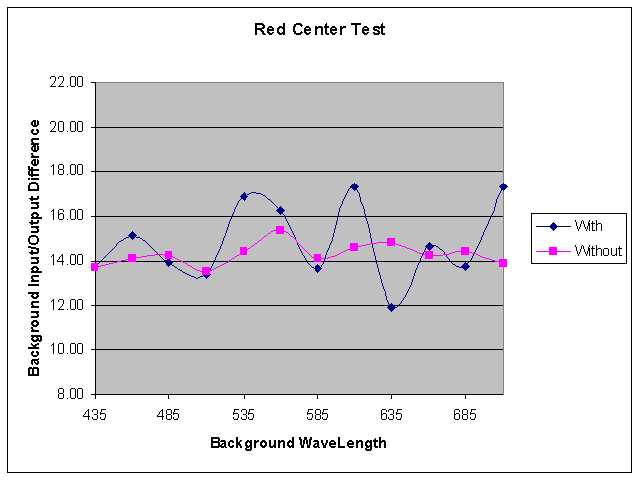
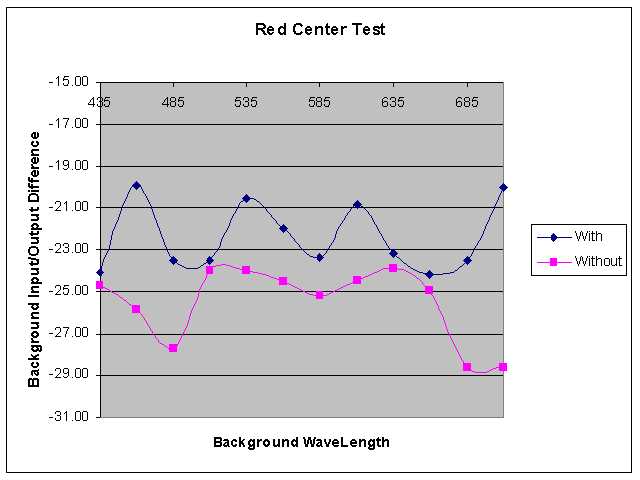
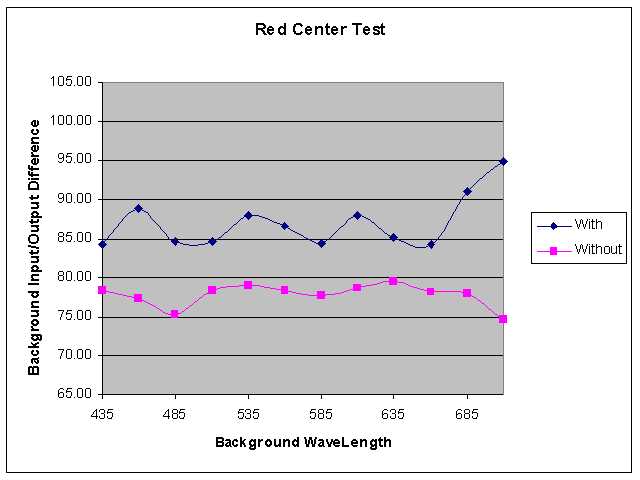
The following three plots show the changes in background color with
and without a center for the three colors, R, G and B. These plots were
generated using two scripts, CompareImagesCenterNo.m which
compares the images without the center to the originals and CompareImagesCenterNo2.m which
compares the images with the center. The data for the images without the
center is stored in centerNoDifferences.mat. The data
for the images with the center is stored in centerNoDifferences2.mat.
Red Color Test
Green Color Test
Blue Color Test
These images show that the camera's analysis for color balancing is not limited to just the
center of the images, but is performed on the entire image.