Image Collection and Evaluation Process in the sets of
Color Balancing
Chia-Hao (Jack) Yu
Alexan@leland.stanford.edu
Introduction
After receiving the pictures from the companies, we decided to use scanners to scan the photographs into the computer for further analysis. For the set of Color Balancing and Red Eyes, the scanner and its settings were the following.
|
Name |
UMAX Astra 2000 P Flatbed Scanner |
|
Scanner Type |
1-pass color flatbed |
|
Scanning Element |
Color CCD |
|
Optical Resolution |
600dpi x 1200dpi |
|
Light Source |
Cold Cathode Lamp |
|
Optics |
Enclosed Optical System |
[Table 1: Scanner Type and Specification]
There was no further adjustment of the setting at the software size, and we used the default setting for all the pictures scanned.
Scanner Testing
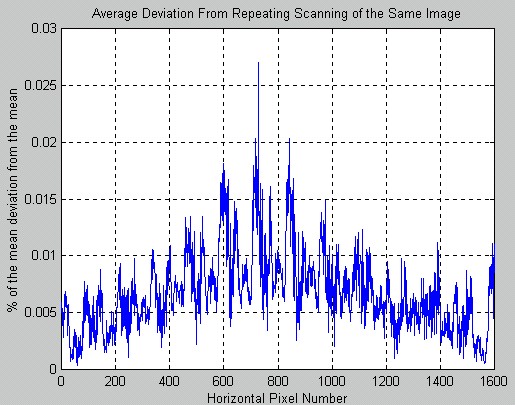
To determine whether or not we could use this scanner to scan photographs, we repeatedly scanned in the same photo for 5 times in different locations respectively. Then, we took the average of the scanned data individual, and calculated the deviation across horizontal direction. Finally, we averaged the deviations.
If the deviations from scans averaged to be more than 5%, then we should consider scanning these pictures with a better and more consistent scanner. The result of this analysis was displayed as following.
|
Test Images |
Analysis Plot |
|
|
|
[Table 2: Scanner Analysis]
From the Analysis Plot above, we could see that the deviation was the greatest at the center, and it fell of like some sort of Gaussian with some interesting modulation. Since the largest deviation was way below 3%, we felt comfortable to scan pictures with this scanner.
Process the Color Balancing Photographs
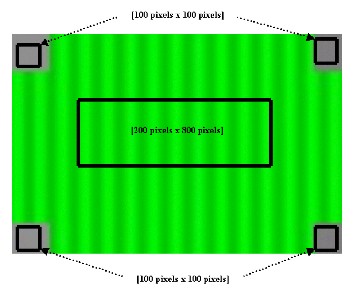
First, we needed to extract the areas of the gray patches, and hopefully, the locations where we extracted the gray patches from would be consistent through the photographs. The reason that we needed this was because we wanted to use Matlab to process 24 pictures with 4 patches each automatically.
Second, we needed to get an area of the color background so we would do analysis on them. Similarly to extracting the gray patches, we also looked for an area that contained only background color through the entire sets of pictures we received from the companies. The following graph was the representation of how we extracted different section of the pictures.
|
|
The average of the box centered at the middle of the picture was taken across vertically, i.e. the resulting representation would be an vector of size [1 x 800]. For the gray patches, the average was taken in both vertical and horizontal directions. Thus, only 1 number per gray patches.